Make a Change Font
Choosing the right font for a project can feel like picking the perfect accessory for an outfit—something that complements the overall look without stealing the spotlight. When I was redesigning the header for a lifestyle blog, I found myself drawn to Make a Change, a handwritten script font that exudes warmth and personality. It wasn’t just about aesthetics; it was about finding a typeface that could support the tone of the content while maintaining readability across different formats.
A Handwritten Touch for Editorial Projects
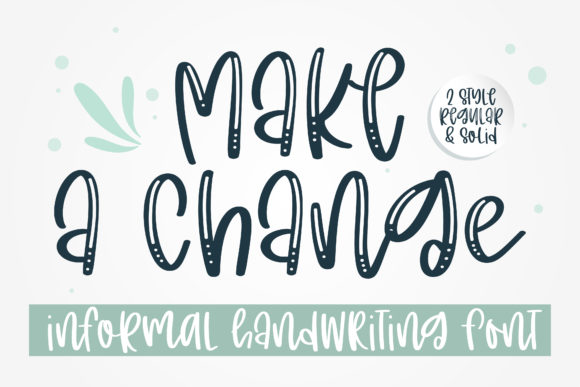
Make a Change is a premium font that blends natural fluidity with a modern edge. Its strokes are soft yet distinct, giving it a personal, almost conversational vibe. This makes it ideal for projects where a human touch is desired, such as a recipe ebook or a wedding guide. The font’s rhythm feels organic, as if it were written by hand, which adds a layer of authenticity to any design.
When used in blog headers or article titles, Make a Change brings a sense of approachability. It works well in digital magazines, where visual hierarchy is key, and the font’s unique character helps draw attention without overwhelming the reader. In a coaching workbook or printable planner, its expressive style can reinforce the creative energy of the content.
Real-World Applications in Design
I tested Make a Change in several editorial scenarios. For a newsletter graphic, it added a friendly, inviting tone that aligned with the publication’s brand voice. In a pull quote for an editorial feature page, the font stood out without clashing with the surrounding text. It also worked well as a chapter opener in a course PDF, offering a visual anchor that guided the reader through the content.
However, it’s important to note that Make a Change isn’t designed for long-form body copy. Its expressive nature makes it less suitable for dense paragraphs or small captions. Instead, it shines as a display font—perfect for headlines, subtitles, and decorative accents. Pairing it with a clean sans serif or a readable serif font can create a balanced and professional look, especially in print materials or PDF exports.
Readability and Practical Considerations
When working with screen readers or mobile layouts, the legibility of a font becomes crucial. Make a Change holds up reasonably well at larger sizes, but its intricate details may not translate as clearly on smaller screens. For this reason, it’s best reserved for headings and short phrases rather than extended text.
For print materials, the font’s texture adds depth and visual interest. In a wedding guide or a printable planner, it can enhance the aesthetic appeal without compromising clarity. When exporting to PDF, the font maintains its integrity, making it a reliable choice for digital downloads and templates.
Pairing Make a Change with Other Fonts
Font pairing is essential for creating a cohesive design. Make a Change pairs well with classic serif fonts like Georgia or Times New Roman for body text, or with modern sans serifs like Lato or Open Sans for captions and navigation elements. This contrast helps maintain visual balance while allowing the script font to take center stage when needed.
In a digital magazine layout, using Make a Change for section headings and a simple sans serif for body copy creates a clear structure. It also works well in packaging design or social media graphics, where a bold, expressive font can capture attention and convey emotion.
What to Check Before Using the Font
Before incorporating Make a Change into a project, it’s wise to review the font’s available styles, alternates, and ligatures. These features can add versatility, especially when designing for multiple platforms or languages. The font also comes in various file formats, making it accessible for different design needs.
For commercial use, such as in ebooks, paid newsletters, or client publications, checking the licensing terms is essential. Make sure the font allows for the intended use, whether it’s for a personal project or a business venture. As a designer, understanding these details ensures that the font enhances the work without legal complications.
Whether you're updating a blog header, crafting a newsletter graphic, or building a worksheet layout, Make a Change offers a fresh and expressive option. Its handwritten charm brings a sense of individuality to any design, making it a valuable addition to a designer’s toolkit. With thoughtful application, it can elevate the mood and identity of a publication while supporting the needs of the audience.